
Hi vExperts and vArchitects,
Yesterday, I sat for the new VMware Certified Advanced Professional – VMware Cloud Foundation Architect (3V0-12.26) exam. Since the study guide recently dropped on the Broadcom Education site , I wanted to share my personal exam experience, how I prepped, and what you should focus on if you’re also planning to take this test soon.
Exam Format & What to Expect
The exam logistics are pretty straightforward:
- Questions: 60 items
- Time: 135 minutes
- Passing Score: 300 (Scaled)
- Delivery: Pearson VUE ($250 USD)
Format wise, almost every single question was multiple choice, with just 1 or 2 drag-and-drop items.
What stood out to me most was the quality of the questions. They were very crisp, clear, and direct, so no weird trick wording or confusing scenarios. The 135-minute time limit felt generous; I had plenty of time left over to review all my flagged questions before submitting.
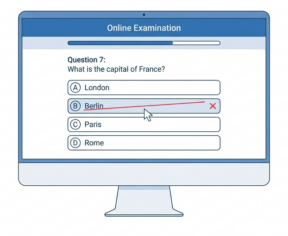
Quick Pearson VUE Tip: If you like using the process of elimination on multiple-choice questions, right-click an answer choice to cross it out. It visually strips away wrong options so you can focus on the choices left.
The Blueprint: 100% Focused on Design
If you look at the official exam blueprint, there is a key detail worth noting. Broadcom uses a standard 5-section blueprint layout across their exams, but for this Architect exam, Sections 4 and 5 have zero testable objectives.
That means 100% of the questions come strictly from Sections 1, 2, and 3:
- Section 1: IT Architectures, Technologies, and Standards
- Section 2: VMware Products and Solutions
- Section 3: Planning and Designing the VMware Solution
There are no questions asking you where to click in an interface or how to run CLI commands. It stays strictly focused on Day 0 and Day 1 Architecture. So focus on translating Business Goals and AMPRS requirements (Availability, Manageability, Performance, Recoverability, Security) into solid design decisions.
How I Prepped & Key Study Tips
If you’re gearing up for this test, here is where I’d recommend spending your study time:
- Master VCF Blueprints: Make sure you know official VCF architecture patterns, component layouts, and workload domain topologies inside out.
- Understand Deployment Models & Sizing: Pay close attention to how business requirements dictate deployment choices (like management vs. workload domain setups, multi-site options, and vSAN storage policies) and know the sizing considerations behind them.
- Get comfortable with new VCF Automation concepts: VCF 9.0 introduces a lot of new automation concepts—such as Provider and Organization frameworks, Projects, Namespaces, Content Libraries, and RBAC. Even if you haven’t had the chance to design or deploy these new features in production yet, make sure you understand the core concepts. Focus on how to design and implement automation to meet business requirements at scale.
- Review the official materials: If you have access, check out the advanced design courses for VCF Compute, Storage, Networking, Automation, Operations, and VKS, along with Broadcom’s Tech Docs.
Final Thoughts
Overall, I thought this was a fair, well designed exam that truly tests whether you understand the VCF Architecture Principles. If you have solid experience with VMware Cloud Foundation and take the time to review the blueprint objectives, you’ll be in great shape.
And last but not least, A big shoutout to all the SMEs who worked on building this exam!
End of this post.
Disclaimer: Please note that the views expressed in this blog are solely my own and should be treated as personal opinions. This content does not hold any legal or authoritative standing.