

Hi vAdmins and vArchitects,
If you’ve been planning your upcoming VMware Cloud Foundation 9.1 or Avi Load Balancer upgrades lately, you know that managing software entitlements across security firewalls and load-balancing infrastructure is undergoing a major shift. In previous releases, licensing often felt like a routine post-upgrade task using standard 25-character serial keys. However, as enterprise environments scale across multi-site and air-gapped topologies, tracking standalone keys across individual controllers and managers quickly becomes unmanageable.
That is why you need to pay close attention to License Hub 2.0 for VMware vDefend and VMware Avi Load Balancer! Starting with vDefend 9.1 (included with VCF 9.1) and Avi Load Balancer 32.1.1, deploying License Hub 2.0 is no longer optional but it is now a mandatory prerequisite to license your infrastructure endpoints.
Instead of registering individual serial keys on each endpoint, License Hub 2.0 acts as a local license broker between the Avi Cloud Console and downstream endpoints, distributing capacity and centralizing usage tracking across your Private Cloud.

Here is a quick overview of what this release brings to your environment and what to watch out for:
- Digitally Signed Subscription Files (.lic): Retires traditional 25-character serial keys in favor of signed subscription files. Pro tip: Key upgrades in the Broadcom Support Portal are non-reversible! If you operate mixed-version environments, make sure to split your license keys in the portal before converting them to the new format.
- Mandatory Endpoint Onboarding: License Hub 2.0 manages and distributes capacity for up to 120 endpoint instances, including NSX Managers (9.1+), Security Services Platforms (SSP), and Avi Controllers (32.1.1+).
- Avi 90-Day Timer & vDefend Enforcement: Upgrading an Avi Controller from an earlier version automatically initiates a 90-day countdown timer on legacy licenses. For vDefend, allowing licenses to lapse blocks security policy creation and halts live threat feed updates.
- Flexible Operating Modes: Fits seamlessly into Connected Mode (automated 24-hour usage reporting), Disconnected Mode (air-gapped setups with manual file exchanges every 180 days), and Private Mode (strictly regulated networks using encrypted bundles).
- Streamlined Appliance Footprint: Deploys as a single virtual appliance OVA requiring 6 vCPUs, 12 GB RAM, and 256 GB storage with built-in SFTP backup/restore and LDAP/Active Directory RBAC integration.
What’s Next?
License Hub 2.0 moves us away from fragmented key management toward a centralized, enterprise-grade entitlement broker across VCF security and load-balancing services. Make sure to factor this appliance deployment and key-conversion workflow into your upgrade prerequisites before touching your production NSX Managers or Avi Controllers!
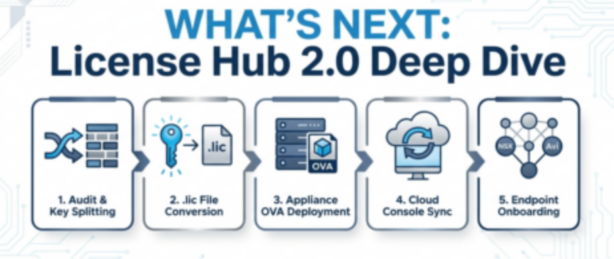
This post sets the stage! In my upcoming follow-up post, we’ll roll up our sleeves and dive into a complete deployment walkthrough and step-by-step key conversion guide like the picture below!
Stay tuned, and as always, happy Private Cloud Building!
End of this post.
Disclaimer: Please note that the views expressed in this blog are solely my own and should be treated as personal opinions. This content does not hold any legal or authoritative standing.