

Hi vAdmins,
With the introduction of VCF 9 and VCF Operations, we’ve seen a growing need for deeper insight into these useful new changes. To address this, we’re launching a new series of updates focused on VCF Fleet Management.
In this blog we will take a closer look at Password Management.
Intro
A robust security posture is essential in modern data centers. When running VMware Cloud Foundation (VCF), it is critical to adhere to industry best practices and your organization’s security policies for password management across all VCF components. The VCF Operations console is the central tool for enabling password updates and remediation across all VMware Cloud instances.
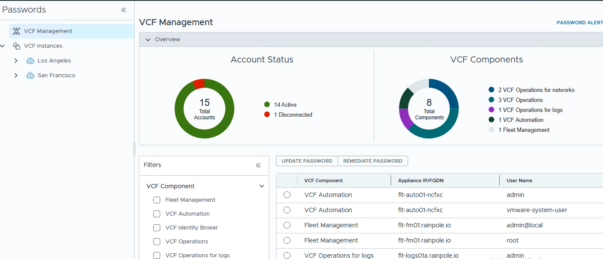
VMware Cloud Foundation (VCF) manages the full password lifecycle for your entire environment. It centrally controls credentials for all integrated VMware components and solutions, including both VCF management components and VCF instance components.

The VCF Operations console enables management of password-related tasks, such as alerts, information, and updating/remediating passwords for VCF Management components and VCF Instances.
Update passwords vs Remediate passwords
To maintain a strong security posture, it is essential to regularly update passwords for VCF components, especially following key personnel changes like an administrator’s departure.
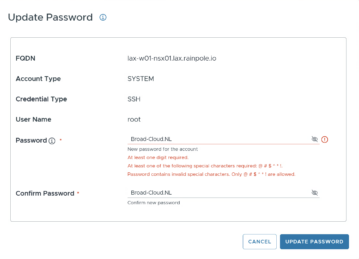
With the REMEDIATE option, you can update a password in VCF Operations to match the password on the entity.

Password rotation
For VCF 9, password rotation for infrastructure components (ESXi, vCenter, NSX) is still handled by the SDDC Manager. You can manage this process from the Security > Password Management menu.
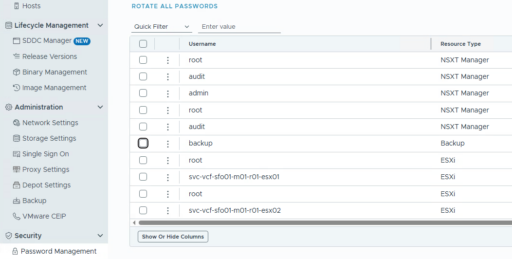
Please be advised that the configuration of the automatic rotation policy for a newly deployed vCenter instance requires up to 24 hours to complete. Additionally, automatic password rotation is enabled by default for all service accounts, which includes those utilized by vCenter.
Password Alerting
In the VCF Operations console, alerts are generated based on the password expiry settings of various components. The VCF instance has a defined password expiry date, which triggers an alert as the date nears, thus promoting timely updates and maintaining system security. However, VCF Management components do not have a password expiry configuration, and therefore, no alerts are generated for them.
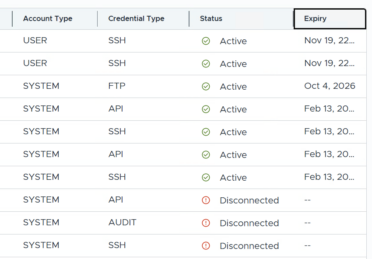
In the screenshot above we sort on expiration date.
Password view
You can view the password expiry for VCF instance components under Infrastructure Operations>Configuration in the VCF Operations console
In the screenshot above we see an overview of all open alerts with the filter: “Alert Type”:Administrative “Alert Subtype”:Password:
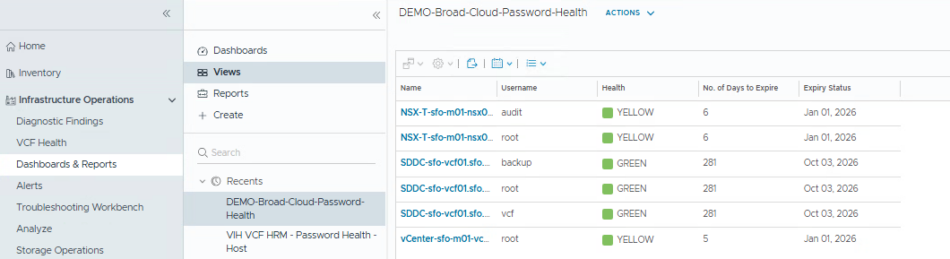
You can also create a customized view based on specific criteria. For inspiration, please refer to the example below!
Conclusion
The strategic relocation of password management from SDDC manager to VCF Operations Fleet Management in VCF 9 represents a significant step forward. This change not only streamlines administrative tasks but, crucially, leverages powerful alerting capabilities to ensure your VCF platform remains secure, stable, and compliant. Embrace VCF 9 to solidify the foundation of your cloud infrastructure.
End of this post.
Disclaimer: Please note that the views expressed in this blog are solely my own and should be treated as personal opinions. This content does not hold any legal or authoritative standing.