

Hi vAdmins,
With the introduction of VCF 9 and VCF Operations, we’ve seen a growing need for deeper insight into these useful new changes. To address this, we’re launching a new series of updates focused on VCF Fleet Management.
In this blog post we will take a closer look at Unified Tag Management.
Intro
Tags are crucial for resource management, identification, organization, searching, and filtering. Historically, pre-VCF 9 environments utilized separate tagging and grouping solutions across vSphere, NSX, VCF Operations, and VCF Automation. This fragmentation caused issues like tag duplication, loss when migrating VMs across vCenters, and general inconsistency.
Why?
This fragmentation caused issues like tag duplication, loss when migrating VMs across vCenters, and general inconsistency.
VMware Cloud Foundation 9 resolves these challenges by introducing a unified, end-to-end workflow. This system allows customers to create, manage, and assign tags, as well as resolve conflicts, all from a single location without the need to manage them in multiple places.
This centralizes tag management, providing consistent behavior across services, and helps to identify and eliminate duplicate tags throughout the vCenter environment.
Capabilities
This new feature allows for the creation, editing, and deletion of both categories and tags from a unified interface, eliminating the need for multiple management locations. It includes the capability to import existing (“brownfield”) categories and tags from vCenters, with built-in evaluation to identify and resolve conflicts. Furthermore, it enables the pushing of categories and tags to vCenters, ensuring that these tags remain consistent and are persisted across vCenters even after a VM is moved (vMotion).
How to “create a central TAG”?
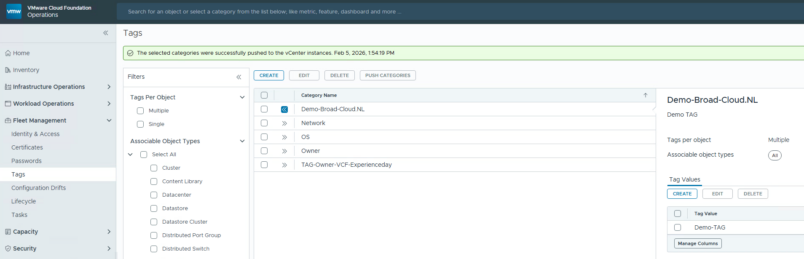
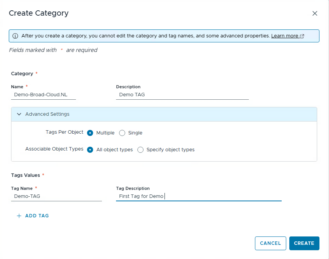
The answer is simple! Just navigate to the Fleet Management menu, open the Tag page, and you’re there. As you can see there is an overview of all available Tags in a single pain of glass. On the screenshot below we are creating a tag, which is just as easy as you’re used to!

Demo
In the demo above, a single Tag is created and centrally pushed to all vCenter instances across the entire platform, a capability that dramatically simplifies management
Summary
This centralizes tag management, providing consistent behavior across services, and helps to identify and eliminate duplicate tags throughout the vCenter environment.
End of this post.
Disclaimer: Please note that the views expressed in this blog are solely my own and should be treated as personal opinions. This content does not hold any legal or authoritative standing.