
Hi vAdmins,
Ever found yourself juggling Multiple Dashboards, monitor systems or spending hours setting up Day-2 Monitoring for (containerized) workloads?
That is why I am super excited to talk about the pre-built community-based Grafana dashboard integration in VCF Operations! This feature turns complex monitoring setups into quick, out-of-the-box configurations.
Moving from Days to Minutes
As Kubernetes workloads scale, infrastructure teams cannot afford to spend hours manually building custom charts. The vision behind this update is simple: compressing dashboard setup tasks from days down to minutes.
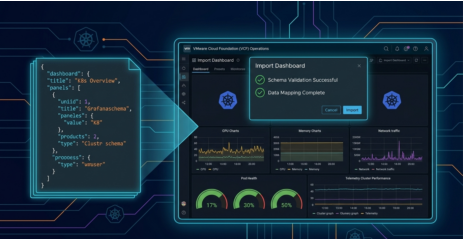
The platform provides out-of-the-box Kubernetes dashboards in Grafana-style formats with real-time metrics and marketplace imports. For instance, the Kubernetes workload metrics dashboard monitors CPU, memory, storage, and POD Health per Container:
- Compute & Memory: View CPU and memory consumption distribution, CPU Usage Rate charts, and memory page fault charts.
- Storage & Pod Health: Track storage consumption, filesystem usage, and overall pod health per container.
Simple Import & Scalable Insights
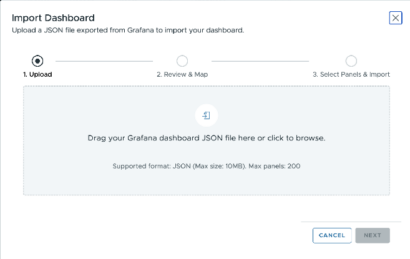
Expanding your observability hub is straightforward. Simply provide the JSON file for any Grafana marketplace dashboard, and the system automatically validates the schema before importing.
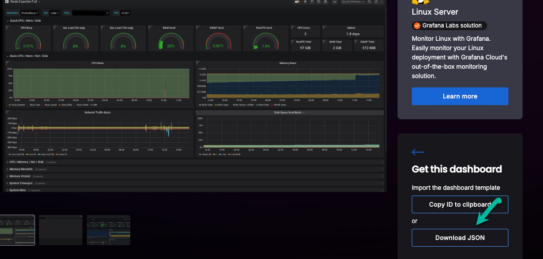
This gives you access to a vast library of community dashboards to centralize your operational data using flexible layouts and interactive filters.
Final Thoughts
Integrating pre-built community Grafana dashboards into VCF Operations is a massive leap forward for day-two operations, simplifying complex monitoring and giving teams back their most valuable asset: time.
Stay tuned for a follow-up walkthrough, and as always, happy monitoring!
End of this post.
Disclaimer: Please note that the views expressed in this blog are solely my own and should be treated as personal opinions. This content does not hold any legal or authoritative standing.