
Hi vAdmins and application owners,
In my previous post, VKS in a Nutshell: What Every vAdmin Needs to Know, we went over how VMware Cloud Foundation integrates container workloads directly onto vSphere. In preparation for the VMware Certified Advanced Professional – VMware Cloud Foundation VKS (3V0-24.25) exam, I’ve been diving deep into VKS and wanted to share my insights with you.
Clicking through the wizard and watching a cluster deploy is the easy part. The real work starts on day two when things start failing and you actually have to troubleshoot. At that point, treating a worker node as just another black-box Linux VM doesn’t cut it. To diagnose issues properly, you need to understand what’s happening inside the Kubernetes layer itself.
Here is a practical look at the core architecture and how it maps to things we manage in vSphere every day.
Virtual Machines vs. containerd
The fundamental shift between virtual machines and containers comes down to how they interact with the kernel. While virtual machines virtualize physical hardware andrequiring every VM to boot a full guest OS with its own kernel for strong isolation at the cost of heavy resource overhead. This containers share the host Linux kernel. Because containers are essentially isolated processes on the host without an OS to boot, they spin up in seconds rather than minutes while keeping resource overhead to a minimum!
Control Plane and Worker Nodes
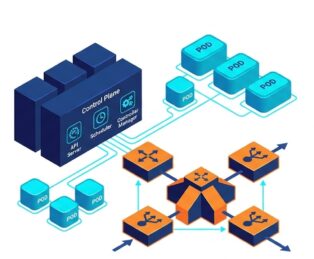
If you already manage an ESXi cluster with vCenter, Kubernetes will feel immediately familiar: a central management layer calling the shots for a fleet of worker nodes. In VKS, this control plane simply runs on a few dedicated management VMs. At its center is the kube-apiserver, which acts much like your vCenter API by processing every kubectl command, internal check, and automation pipeline. All cluster configuration and desired state are stored in etcd, a distributed key-value database that deserves the same operational care and fast storage as your vCenter database. Workload placement is handled by the kube-scheduler, which is essentially VMware DRS for Pods and which evaluates node capacity and placement rules to decide where containers land. Meanwhile, the kube-controller-manager functions like vSphere HA reconciliation loops, constantly watching cluster health and automatically spinning up replacement Pods if a node or workload fails.
The Worker Nodes
Worker nodes handle the actual customer workloads, powered by three main components running on each host. The kubelet acts as the primary node agent—much like hostd on an ESXi host—by registering the node with the API server, monitoring assigned Pods, and commanding the runtime. That runtime is containerd, the low-level engine executing the containers. Meanwhile, kube-proxy manages local networking rules (via iptables or IPVS) on each node to route Layer 4 packet traffic for internal services.
How a Deployment Executes
Applying a YAML manifest triggers a quick 5-step sequence.
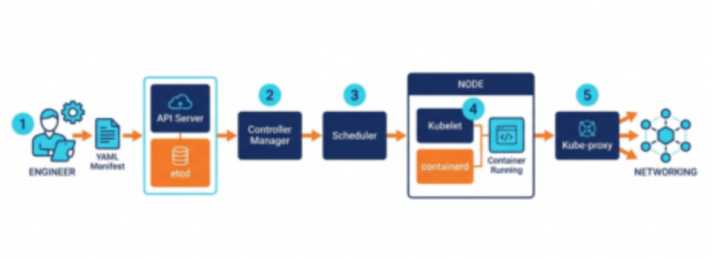
- Submit & Save:
kube-apiserverreceives the YAML and writes the state toetcd. - Detect:
kube-controller-managerspots the new desired workload. - Place:
kube-schedulerselects the best worker node for the Pod. - Run:
kubeleton the node tellscontainerdto pull and launch the container. - Route:
kube-proxysets up local network rules so traffic can flow.
Core Workload Objects & Isolation
While the deployment unit in vSphere is a virtual machine, Kubernetes defines applications using declarative objects tailored to specific workload needs. At the foundation is the Pod, the basic building block that usually holds a single container (or occasionally a tightly coupled pair sharing network and storage). For stateless web backends, Deployments handle scaling, seamless rolling updates, and quick rollbacks. When working with stateful databases that demand predictable identities and ordered startup, StatefulSets assign deterministic names like db-00 and db-. Background tasks like logging or network agents use DaemonSets to ensure a copy runs on every worker node, while batch tasks rely on Jobs and CronJobs to run to completion and free up compute resources.01
To keep these workloads organized, Namespaces provide logical boundaries within a cluster is much like vSphere Resource Pools. Meanwhile, application settings and sensitive credentials are decoupled directly from your code using ConfigMaps for plain configuration data and Secrets for tokens and certificates.
Networking & Persistent Storage
Containers are ephemeral. Pods are created, rescheduled, and destroyed frequently, each time receiving a new dynamic IP address. You cannot rely on static IPs or traditional firewall rules pointed at individual Pods.
Services & Ingress
Since Pods constantly get created and destroyed with new IP addresses, Services give you a stable, permanent entry point and load balance traffic across them:
ClusterIP: Default internal-only IP for pod-to-pod communication inside the cluster.
NodePort: Opens a static port on every worker node—quick for testing, but rarely used in production.
LoadBalancer: The standard choice for real workloads. It integrates directly with your infrastructure (like Avi / NSX ALB in VCF) to automatically spin up a proper corporate or public IP.
Ingress: The smart Layer 7 traffic cop. It handles domain-based routing, URL paths, and SSL termination before passing requests off to your Services.
CNI (Container Network Interface): The network plugin that actually hooks Pods together. In VKS, Antrea (powered by Open vSwitch) is the default engine under the hood.
Persistent Storage
When a Pod dies or gets rescheduled to another host, its stateful data must seamlessly follow it. To make this happen, a developer simply requests storage capacity using a PersistentVolumeClaim (PVC) tied to a StorageClass that defines performance and provisioning policies. The vSphere CSI plugin intercepts this request and calls the vCenter API to dynamically provision a First Class Disk (FCD) on your vSAN, VMFS, or NFS datastores, attaching it directly to the worker VM running the workload. This enables developers to work purely with native Kubernetes storage abstractions, while vAdmins maintain full visibility and policy-based storage control (SPBM) right inside vCenter.
Application Packaging & Service Mesh
Managing dozens of individual YAML manifests manually quickly becomes impractical as your applications grow. To simplify this, Helm acts as the package manager for Kubernetes (think apt or yum), bundling all your manifests into single, reusable charts so you can easily deploy, parameterize, and upgrade entire app stacks consistently across dev, staging, and production. For larger microservice environments, Istio handles the complex networking and security between services by automatically attaching tiny Envoy sidecar proxies next to your Pods—delivering mutual TLS (mTLS) encryption, smart traffic routing, and deep observability metrics without requiring you to touch a single line of application code.
Key Takeaways
Kubernetes does not replace underlying infrastructure but it is an abstraction layer designed to Automate Compute, Networking, and Storage Consumption.
Stay tuned for the next post in my VCAP-VKS prep series, where we’ll take a deep dive into the vSphere Supervisor architecture!
End of this post.
Disclaimer: Please note that the views expressed in this blog are solely my own and should be treated as personal opinions. This content does not hold any legal or authoritative standing.