

Today I’d like to talk about the VCF Business Services Console, the central place for managing and activating your VCF and Add-on Licenses. The VCF Licensing mechanism can be deployed in two ways: connected mode which is suitable for networks without air gaps, while disconnected mode is designed for air-gapped networks.
The license management of the VCF environment is managed from the VCF Operations console.

The license management of your VCF subscriptions is managed from the VCF Business Services Console.
Connected mode.
To be able to consume your VCF licenses , you need to register your VCF Operations instance first on the VCF Business Services console.
Click on “Go to Registration” and click on start registration”
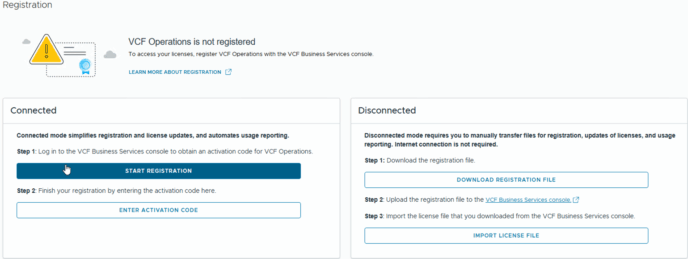
Screenshot from VCF Operations console
Log in to the VCF Business Services console with your Broadcom Enterprise account associated with the subscription.

Before you can consume the license in your environment, it is necessary to assign the licenses(pool) to the VCF Operations instance and register it in the VCF Business Services console. Once the licenses are successfully added to your VCF Operations instance, you are able to assign them to the vCenter instances.
The FQDN of the current VCF Operations instance will automatically be populated for the display name, which can be modified.

After you confirm by save the settings, you can assign the desired licenses.
Keep in mind thatIt is also possible to split licenses during this step, which can be useful in case you want to distribute licenses across different VCF instances.

After you confirm this step by save the settings, a short summary will pop up.

In this final step, you can obtain the activation code and copy it to your clipboard.

Now it is time to switch back to the VCF Operations console and paste the activation code.
When the activation code has been transferred you can activate this licenses.

The VCF licenses are now activated and in wil be visible.

One more thing!
With Usage Analytics you have a detailed overview of the licenses including consumption.
This is the end of this post, good luck with your license manangement!
End of this post.
Disclaimer: Please note that the views expressed in this blog are solely my own and should be treated as personal opinions. This content does not hold any legal or authoritative standing.