
Maintaining a healthy and high-performing cloud environment requires rapid identification and resolution of issues. With VCF 9.1, the troubleshooting process has been fundamentally enhanced, providing administrators with deeper visibility and powerful new tools right within the VCF Operations console.
These key improvements like Real Time metrics collection, the ability to create custom dashboards, and enhanced collaboration via notes ensure that identifying and fixing issues is faster and more streamlined than ever before. Real-Time Metrics introduces a significant leap forward in metrics collection and visualization, so let’s have a look!
Real Time tab
Administrators can access granular metrics via the Real Time tab within the troubleshooting workbench.

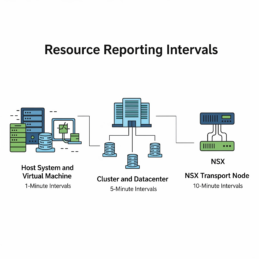
Reporting Intervals for Performance Data Collection
The collection and reporting intervals for performance data are specifically tailored to the resource type, with varied frequencies designed to balance granularity and historical record keeping. Host System and Virtual Machine (VM)Data collection for Host Systems and VMs is the most frequent. High-granularity collection for a limited set of approximately 21 key metrics occurs every 2 seconds. For general, standard real-time performance monitoring, the interval is 20 seconds. For tracking historical performance, the default interval utilized by PerformanceManager is 5 minutes.Cluster and DatacenterFor Cluster and Datacenter resources, metrics sourced directly from the VPXD Stats Registry are reported every 60 seconds. Standard reporting for relevant PerformanceManager metrics occurs every 5 minutes.NSX (Transport Node)NSX Transport Nodes provide high-frequency metric availability for immediate operational insight every 60 seconds. The standard monitoring frequency for routine checks is 5 minutes.
TopN tab
To further accelerate diagnostics, the troubleshooting workbench includes a “TopN” tab, allowing administrators to quickly identify the highest-contributing (or “top”) VM, Host, Cluster, Datacenter, NSX, and vSAN objects, helping narrow the focus when performance issues arise.
Notes section
This allows teammates to capture and store detailed findings, observations, and ongoing status updates directly within the workbench. These notes are instantly available to anyone logging into the VCF Operations troubleshooting workbench, ensuring consistent documentation and seamless collaboration.

Final Thoughts:
The operational enhancements introduced in VCF 9.1 represent a significant leap forward in platform management and troubleshooting. The high-frequency Real Time metrics collection is truly a game-changer, providing unprecedented granularity for diagnosing application workload performance and facilitating critical troubleshooting. With data collected as frequently as every 20 seconds (and optionally as low as 2 seconds for ESX hosts), administrators gain a level of visibility previously unattainable
End of this post.
Disclaimer: Please note that the views expressed in this blog are solely my own and should be treated as personal opinions. This content does not hold any legal or authoritative standing.