

Hi Private Cloud Administrators,
This blog post contains my preparation notes for the VCAP Operations exam. I began my study process by consulting the official exam study guide, as I always do. Below, you will find my insights for each exam objective. As you may have observed, this Role-Based VCAP exam is comprised of a single section: Section 4 – Install, Configure, Administrate the VMware Solution. This exam is expected to heavily focus on installation and day-two operations.
Let’s kick off by exploring the exam sections outlined from the official exam guide.
Objective 4.1 – Complete Day 2 Tasks in VCF Operations
VCF Operations in VCF 9 utilizes collector groups to efficiently organize and manage cloud proxies. A cloud proxy is a virtual appliance that is deployed to gather essential data (e.g., metrics, logs) from various objects in your environment, including vCenter Server instances and other elements that constitute the VCF fleet.
Build Automated Jobs:
The Automation Central is the hub for creating automated jobs to manage your virtual machines. These jobs can automate key optimization actions, such as reclaiming resources and rightsizing VMs. Additionally, you can schedule other essential VM and instance actions, including powering on, powering off, and rebooting.

Scale Components:
To increase resource allocations for components—such as vCPUs, RAM, and disk capacity—on cluster nodes, utilize VCF Operations fleet management. The Vertical Scale Up option is supported for both VCF Operations and VCF Operations for logs.


See also this great KB: Broadcom KB about Scaling UP
RBAC:
Role-Based Access Control (RBAC) is a key method for advanced security, restricting access based on an employee’s defined organizational role. The roles within RBAC specify an employee’s level of system access. This framework allows organizations to control end-user permissions comprehensively, from broad to detailed levels. By designating roles (e.g., administrator, content administrator, or read-only), organizations can align permissions precisely with employee positions, ensuring users only receive the access required to fulfill their job responsibilities.


Integrations:
You can use the Administration page to configure and manage Integration accounts, Cloud Proxies, and Collector Groups.


Objective 4.2 – Manage VCF Capacity with VCF Operations

Capacity management:
The What-If tool allows you to strategically plan for changes in workload and capacity across your virtual infrastructure. The What-If Analysis page facilitates this through seven core planning and comparison areas:
- Workload Planning: Traditional and Hyperconverged
- Infrastructure Planning: Traditional and Hyperconverged
- Migration Planning: VMware Cloud and Public Cloud
- Datacenter Comparison: Private Cloud
For comprehensive background and insights, see also my previous posts from 2024 and 2023.
VMware Aria Operations out of the box capabilities with VVF and VCF
VMware vRealize Operations 8 part 3
VMware vRealize Operations 8 part 2
Manage VCF Capacity with VCF Operations
When discussing system resources and performance, you’ll often encounter the following essential capacity concepts:
- Total Capacity: This is the full, configured capacity of the system.
- Limit: This represents a user-defined capacity ceiling—the maximum limit that a resource or workload can be allocated.
- Usable Capacity: This is the capacity that can actually be utilized. It’s calculated by taking the total allocated resources and subtracting the capacity that has been reserved for high availability (HA).
- Entitlement: The system determines this value based on a combination of assigned shares, reservations, and the defined limit.
- Reservation: This is a specific, user-defined amount of capacity that is explicitly booked or reserved for a workload.
- Demand: This is the amount of capacity (number of resources) that a workload needs at a particular moment in time.
- Usage: This is the actual amount of capacity a workload is currently consuming.
The VCF Operations platform includes a sophisticated Capacity Engine.
The engine uses Demand and Usable Capacity metrics as input to generate the following critical output metrics
- Time Remaining
- Capacity Remaining
- Recommended Size
- Recommended Total Capacity
This engine performs real-time predictive capacity analytics, analyzing historical utilization to accurately project future workload demands. It is built on an industry-standard statistical analysis model of demand behavior.
To accurately predict future capacity needs, you can leverage custom profiles tailored to your environment
Let’s have a look at the current capacity of our cluster
To apply a custom profile we first have to create a (capacity) Policy and assign it to a cluster


To get more experience with What IF Scenario’s you can also make use of VMware HOL.
Capacity Optimization, Planning, and Green Score With VCF Operations (HOL-2601-18-VCF-L)
Objective 4.4 – Cost Management in VCF Operations
Cost management:
VCF Operations provides robust Cost Management capabilities, enabling organizations to track and optimize expenditures across their private clouds, public clouds, and VMware Cloud Infrastructure.
With Cost Management, you gain the ability to:
- Monitor and Analyze Costs: Keep a close eye on the financial aspects of hosting your entire infrastructure and fleet.
- Gain Cost Breakdown Insights: Understand the detailed breakdown of costs associated with running your virtual machines (VMs).
- Facilitate Billing and Chargeback: Easily bill and charge internal customers or departments for the resources consumed by their running VMs.

Keep in mind that cost are based on Cost Driver(s) which can be modified.


‘Specific datacenter’ mode enables you to customize different cost driver values for different datacenters. Any customizations done in ‘All datacenters’ mode will be lost. Do you want to continue?
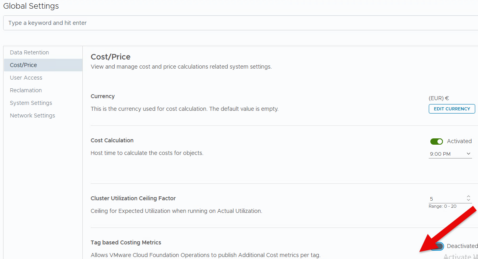
VCF Automation and VCF Operations allow you to significantly enhance your cost and price calculations by publishing vCenter tags as additional TAG-Based Costing Metrics once the Tag Based Costing Metrics feature is activated across your VCF environment
The Capacity Engine supports various methods for calculating hardware depreciation:
Max of Double or Straight: This method compares the yearly depreciation amounts calculated by two different methods—the Double Declining Balance method and the Straight Line method—and uses the higher of the two values for the effective yearly depreciation. This approach is designed to front-load depreciation, meaning the majority of the asset’s value is depreciated in the earlier years of its life.
Straight Line Depreciation: This is a simple method where the asset’s value is depreciated by the exact same amount each year over its entire useful life (the configured number of depreciation years).
VCF Operations offers the following distinct methods for calculating the base rates for your clusters:

- Cluster Usable Capacity After HA and Buffer
- Calculation Method: Cluster costs and base rates are determined using the usable capacity (which is the total capacity minus the capacity reserved for High Availability (HA) and any configured buffer).
- Cost Distribution: This method ensures that the costs associated with hosting and maintaining the HA and buffer resources are effectively distributed across the cluster’s total costs, base rates, and, ultimately, the cost of individual virtual machines (VMs).
- Cluster Actual Utilization
- Calculation Method: Base rates are calculated based on the cluster’s total cost and its average utilization.
- Impact on VM Costs: Virtual machine costs are derived directly from these base rates.
- Dynamic Rates: A key characteristic of this method is that the base rates can frequently change, as they are directly tied to the real-time utilization of the cluster.
Cloud Provider Cost
In the VCF Operations console, you have the ability to customize and configure rate cards for all your cloud providers. For local or custom/unknown providers, you can simply create a new rate card from scratch!


You can perform in-depth analysis to identify the top and bottom performing objects
Objective 4.5 – Managing VCF Operations with VCF Policy
Policy (assignment):
Before leveraging the Chargeback feature, you are required to set up preliminary configurations. All information needed to implement Chargeback is available.

Objective 4.6 – Workload Optimization in VCF Operations
To begin, note the distinction: DRS operates at the Cluster level, whereas Workload Placement functions at the Data Center (DC) level.

Business Intent = TAG based placement. Start with creating and assigning TAGs from vCenter Server
To define a business intent for cluster-level placement, you can assign tags to predefined categories (Operating System, Environment, Tier, Network, and Other) or establish custom categories.
Operational Intents

*Keep in mind to first unlock “workload Optimization

See also this amazing blog: https://puneetsharma.blog/2026/02/20/part-3-enforcing-vcf-9-0-governance-through-business-intents/
Objective 4.7 – Monitor Applications with VCF Operations


The Telegraf agent facilitates application monitoring. To deploy the agent to the target virtual machines, navigate to the Workload Operations menu and select the appropriate options.

To start with, it is important to realize that DRS is only Cluster Aware, while Workload Placement is Data Center (DC) Aware.
The VCF Operations Console unifies various VMware applications into a single platform, serving as the central management console for vSphere Foundation. It provides centralized and detailed monitoring through numerous dashboards, covering:
- Health, Performance, and Capacity:Centralized monitoring and detailed display of component metrics.
- Log Management: Simplified analysis, generation, and collection of logs across all vSphere Foundation components.
- Security Operations: Analytics and notifications to help administrators identify and mitigate potential security risks.
In VCF 9, collector groups are a feature within VCF Operations designed to organize and manage cloud proxies. Cloud proxies are virtual appliances deployed to collect data—such as metrics and logs—from objects within your environment, including vCenter Server instances and other components across the VCF fleet.
Role-Based Access Control (RBAC) is a primary method for advanced access management that restricts access based on a person’s defined role within an organization. These roles correlate to specific levels of access. Through RBAC, organizations can precisely control end-user usage at both high and granular levels, for example, by designating users as administrators, content administrators, or read-only users. Access permissions are strictly aligned with an employee’s organizational position and are allocated only to the extent required for them to perform their jobs.
Application monitoring relies on the Telegraf agent. You can deploy this agent to your target virtual machines by using the options available in the Workload Operations menu.
Automation Central is the hub for creating automated jobs to manage your virtual machines. These jobs can automate key optimization actions, such as reclaiming resources and rightsizing VMs. Additionally, you can schedule other essential VM and instance actions, including powering on, powering off, and rebooting.
Jobs can be customized to run only when certain parameters are met. For example, if you set an action to delete a snapshot, you can specify the minimum age the snapshot must reach before deletion occurs. You can also schedule jobs directly from the Reclaim and Rightsizing pages, where the job is configured in response to a recommendation provided by VCF Operations.
The Administration page provides centralized control over your VCF Operations console’s configuration. This is where you manage foundational components like Integration accounts, cloud proxies, and collector groups. It also allows you to configure essential Global Settings, including data retention history, cost/price unit, and session timeout.
Objective 4. 9 – VCF Operations Troubleshooting Tools and Methodologies
Alert:

4.11 – Creating Super Metrics in VCF Operations
see this amazing blog post below:
https://thecloudxpert.net/2025/04/11/creating-supermetrics-to-show-vm-rightsizing

Objective 4.12 – Log Event Monitoring and Analysis in VCF Operations
You can specify the desired time range for your data on both the Dashboards and Explore Logs pages in the web interface; time ranges are inclusive for filtering.
Search Functionality:
- You can search for log events that match the values of specific fields.
- Using quoted text (e.g.,
"error message") in the main search field matches exact phrases. - Entering a space between terms acts as a logical AND operator.
- The search uses only full tokens. For example, a search for
"err"will not match the word"error".
The log collection configuration is stored in the VMware Cloud Foundation Operations for logs
cluster, but updates are always initiated through VCF Operations.

You can configure Log collection from the configuration page.

Objective 4.14 – Complete Fleet Management activities in VCF Operations
SSO:
Configure LDAP or LDAPS
The default port numbers for LDAP are
389 for standard, unencrypted communication and 636 for secure LDAP (LDAPS) over SSL/TLS. Active Directory and other directory services use these ports for client-server communication, with 389 serving clear-text requests and 636 providing encryption for sensitive data.
AD/LDAP (Active Directory over LDAP): Users and groups are provisioned and synced at period-
ic intervals. The entire directory is not synced, only users and groups that are specified. Passwords
are never synced.

Objective 4.15 – Manage VCF licensing with VCF Operations
VCF Licensing:
Starting with version 9.0, licensing transitions from keys to subscriptions. To license your environment, you must have an active subscription for your product. Available capacity is tracked and displayed by the product’s unit of measure (e.g., vSphere uses cores, and vSAN uses TiBs). The final step for licensing is to install a VCF Operations instance and register it in the VCF Business Services console.


Objective 4.16 – Monitor Security, Compliance and Configuration in VCF Operations
You can find further insights on this topic in my latest post regarding VCF Fleet Management.
Security – Security Operations
Summary
The VMware Role Based exam portfolio has been significantly expanded with the introduction of the Advanced VMware Cloud Foundation 9.0 Operations (3V0-22.25) exam.
This comprehensive new certification test is designed to thoroughly cover all aspects of the most current version of VCF Operation. Passing this exam will not only result in a certification but also the prestigious VCAP Operations badge.
Start your preparation today and best of luck in earning this significant credential!
End of this post.
Disclaimer: Please note that the views expressed in this blog are solely my own and should be treated as personal opinions. This content does not hold any legal or authoritative standing.