

Let’s be real, taking down a highly available application cluster just to expand a shared disk has always felt completely backwards. You spend all this time architecting a bulletproof Windows Server Failover Cluster (WSFC) or Oracle RAC to ensure maximum uptime, only to be forced into a maintenance window the second you need to add some capacity.
For those of us who remember the good old days of RDMs on traditional storage arrays, this was a pretty glaring gap in vSphere. But I’ve got good news: with the release of VCF 9.1, that headache is officially history.
Clustered applications are finally getting some much-deserved love in this release. The biggest highlight? We now have zero-downtime hot-extend for shared virtual disks.
How It Actually Works
vSAN 9.1 lets you dynamically expand shared virtual disks on the fly, without ever taking the app cluster offline. This works for both of the main ways we share VMDKs:
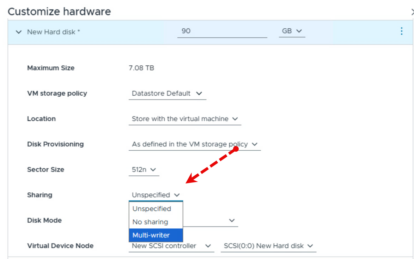
- The Multiwriter Flag: This is for apps like Oracle RAC and Red Hat Cluster Service (RHCS) that have their own logic built-in to handle write-ordering and locking.
- Clustered VMDKs (SCSI3-PR): This is the newer, supported method for Windows Server Failover Clusters (WSFC). It uses SCSI-3 Persistent Reservations over a shared virtual SCSI bus to act as the traffic cop, so we don’t have to override vSphere’s native locking.
The Magic Under the Hood
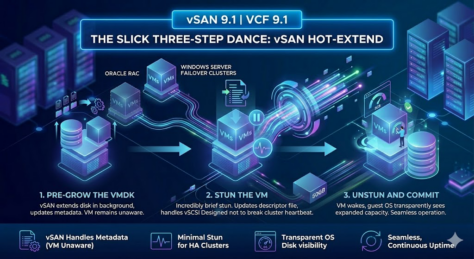
To make sure your app doesn’t freak out during the expansion, vSAN handles the hot-extend in a slick, three-step dance:
1. The Silent Expansion (Pre-grow the VMDK) First, vSAN goes to work in the background, extending the virtual disk and updating the underlying storage metadata. The best part? The VM keeps running normally and is completely oblivious to the changes happening under the hood.
2. The Micro-Pause (Stun the VM) Next, vSAN initiates a lightning-fast stun. This ultra-brief pause is just long enough to update the disk’s descriptor file and handle the necessary vSCSI tasks. It’s specifically engineered to be so fast that your cluster’s heartbeat won’t miss a beat, preventing any unwanted failovers.
3. The Reveal (Unstun and Commit) Finally, the VM wakes right back up. The guest OS seamlessly registers the brand-new, expanded VMDK capacity without you having to lift a finger. Zero downtime, zero disruption, and total transparency.
Deploying Clustered Apps via VCF Automation Just Got Easier
In the past, trying to deploy these clustered apps through VCF Automation was a bit of a non-starter because the Supervisor’s persistent volumes (backed by CNS) didn’t support the multiwriter setup.
VCF 9.1 fixes this, too. The VM service has been updated so you can explicitly configure virtual storage controllers and provision shared virtual disks natively. Whether you’re spinning up an Oracle RAC (multiwriter) or a WSFC (SCSI3-PR), you can now roll them out directly through VCF Automation.
A Quick Note on Legacy Storage Policies
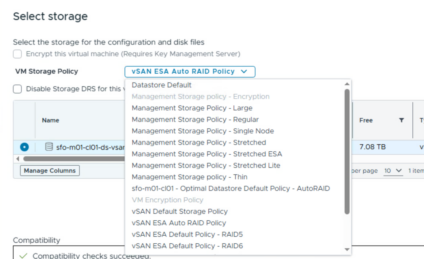
If you’ve been around the vSAN block a few times, you might remember that before vSAN 7.0, shared disks using the multiwriter flag had to use the Eager Zero Thick (EZT) format. You usually did this by setting the Object Space Reservation (OSR) to 100.
Since EZT completely goes against vSAN’s thin-provisioned nature, I just want to remind everyone: you don’t need to do this anymore. Native shared VMDKs are hands-down the best way to share block-based volumes in modern vSAN setups.
Final Thoughts
If you’re ready to test this out in your own environment, you only need two things: vSAN 9.1 and vCenter 9.1.
For anyone who has ever had to schedule a maintenance window just to add a little storage capacity, this update is a breath of fresh air. Expanding shared VMDKs on the fly is a game-changer for meeting strict SLAs, taking the operational pain out of lifecycle management, and keeping your HA clusters doing what they do best—running without interruption.
End of this post.
Disclaimer: Please note that the views expressed in this blog are solely my own and should be treated as personal opinions. This content does not hold any legal or authoritative standing.