
Hi vAdmins and vArchitects,
In our previous walkthrough , we covered deploying and binding License Hub 2.0 inside the Avi Cloud Console to centralize entitlement distribution across multi-site environments. Today, we are taking a step back upstream to focus on a critical architectural shift on the Broadcom Support Portal: the transition from 25-character serial keys to Secure License Keys (LIC 2.0).
Whether you are preparing to deploy VMware vDefend 9.1 or VMware Avi Load Balancer 32.1.1, understanding how to manage, split, and upgrade your license entitlements on the portal is essential to avoid activation failures or legacy operational disruptions.
The Architectural Shift: Serial Keys vs. Secure License Keys (LIC 2.0)
Under the updated VMware licensing framework, two distinct key formats exist on the Broadcom Support Portal:
- Standard Serial License Keys: Traditional 25-character alphanumeric strings used exclusively for legacy builds (vDefend releases prior to 9.1 and Avi Load Balancer releases prior to 32.1.1).
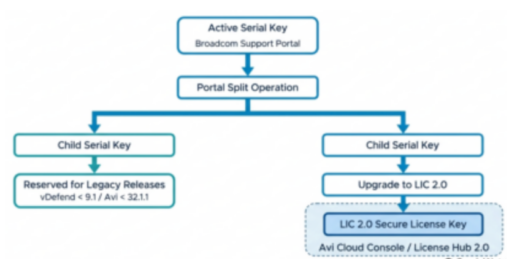
- Secure License Keys (LIC 2.0): Digitally tagged as LIC 2.0 on the support portal. Secure keys are generated by upgrading active serial keys. Once imported into a License Hub or Avi License Pool within the Avi Cloud Console, they issue cryptographically signed license files (
.lic) to downstream endpoints.
Critical Architectural Constraint: Upgrading a serial key to a LIC 2.0 Secure License Key is permanent and non-reversible. Secure keys cannot activate legacy software versions
Capacity Planning & The Pre-Upgrade Split Strategy
Because secure key upgrades cannot be rolled back, proactive capacity planning is mandatory if you maintain a mixed-version infrastructure.
Before converting any entitlements, audit your infrastructure capacity:
- Audit Deployment Requirements: Calculate the exact core or service unit capacity required for vDefend 9.1 / Avi 32.1.1+ versus legacy environments.
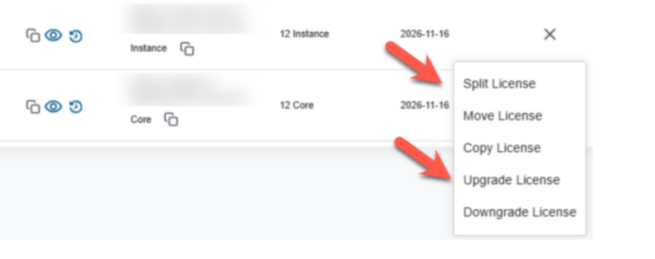
- Execute Portal Split First: Split your existing serial key into child keys on the Broadcom Support Portal before initiating an upgrade. This preserves legacy capacity under standard serial keys while isolating the capacity needed for modern deployments.
- Verify Target SKU Eligibility: Ensure your entitlements match eligible target product SKUs:
- VMware Avi Load Balancer:
ANS-VMW-ALB,NFR-ANS-VMW-ALB. - VMware vDefend Firewall:
ANS-VMW-FW,NFR-ANS-VMW-FW. - VMware vDefend Advanced Threat Prevention:
ANS-FW-ATP,NFR-ANS-FW-ATP,ANS-FW-ATPAD,NFR-ANS-FW-ATPAD.
- VMware Avi Load Balancer:
Step-by-Step Portal Execution Guide
Phase 1: Accessing Portal Entitlements
- Log in to the Broadcom Support Portal using an account linked to your Site ID.
- Navigate to My Entitlements and choose Application Networking and Security from the products drop-down menu.
- Locate your site, click your product name (or the specific vDefend sub-component SKU), and navigate to Entitlement Details > Licenses to open the VMware Licensing page.
Phase 2: Splitting Serial Keys for Legacy Capacity
To divide service units and preserve capacity for earlier releases:
- Select the required active serial license key and choose Split License from the vertical ellipsis menu (
⋮). - In the Split License Key window, enter the unit/core count to allocate to the new key.
- Click + Add Key to assign remaining units across additional child keys until the unallocated balance reaches zero.
- Confirm the split operation.
Final thoughts
Transitioning your entitlements to Secure License Keys (LIC 2.0) is a required gateway for scaling modern VMware Cloud Foundation 9.1 architectures. By performing capacity planning and key splitting upfront, you ensure seamless compliance for vDefend 9.1 and Avi 32.1.1 without risking legacy endpoint availability.
Stay tuned, and as always, happy Private Cloud Building!
End of this post.
Disclaimer: Please note that the views expressed in this blog are solely my own and should be treated as personal opinions. This content does not hold any legal or authoritative standing.